
Home » Vtiger Extensions » PDF Maker for Vtiger CRM | Custom PDF Templates
PDF Maker
for Vtiger CRM
Create professional invoices, quotes, contracts and custom PDF documents directly inside Vtiger CRM.
Trusted by 15,000+ users since 2010.
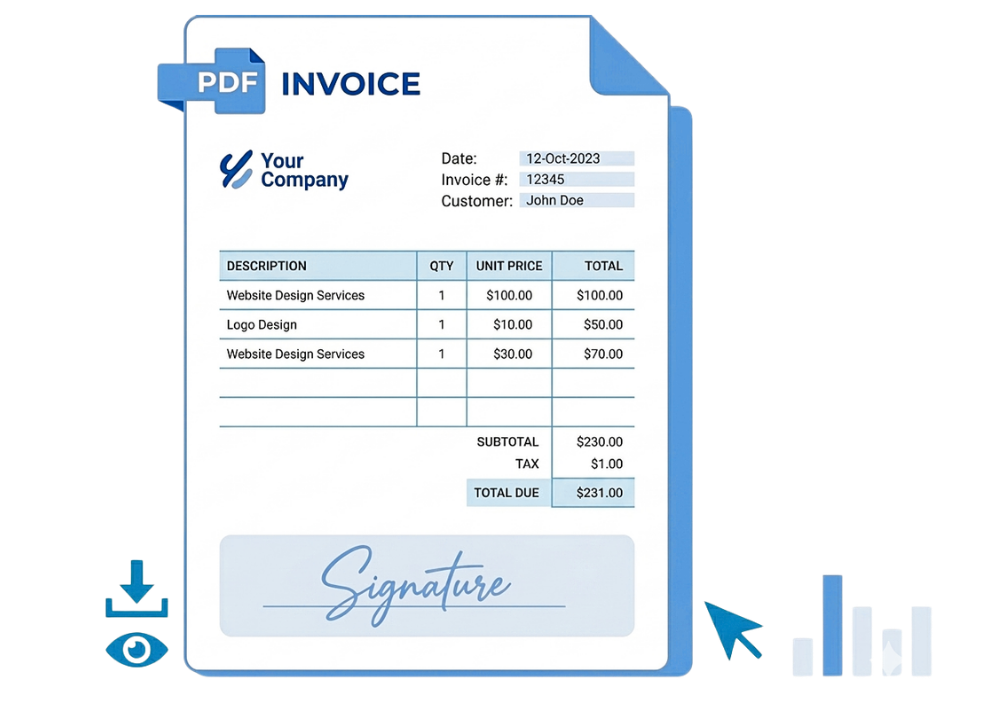
The most advanced Vtiger PDF Maker on the market
What is Vtiger PDF Maker?
This powerful extension allows you to generate professional PDF documents directly from your CRM.
PDF Maker is ideal for companies that need branded invoices, quotes, contracts, sales orders, delivery notes or custom CRM reports generated directly from Vtiger.
Whether you need invoices, quotes or custom reports, this tool gives you
full control over layout and content.
Our solution is built for flexibility and performance, making it the ideal
PHP-based PDF generator for modern CRM environments.
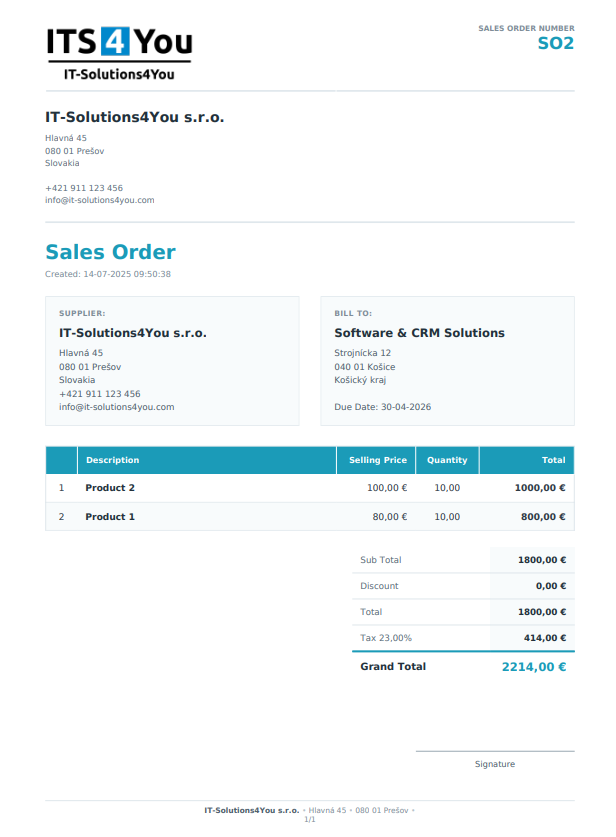
PDF Maker vs Default Vtiger PDF Export
| Feature | Default Vtiger PDF Export | PDF Maker for Vtiger CRM |
|---|---|---|
| Custom templates |
Very basic Limited template options with only simple layout control. |
Advanced Create highly customized templates with HTML and CSS support, giving you almost unlimited design possibilities. |
| AI Assistant |
Not available. Standard Vtiger PDF export does not include AI assistance for template creation, editing or improvement. |
Built in AI Use the built in AI Assistant to create, improve and edit PDF templates directly inside PDF Maker. |
| AI tokens included |
Not included. No AI token package is available in the default Vtiger PDF export. |
Included PDF Maker subscription includes monthly AI tokens, so users can work with AI without purchasing a separate AI setup. |
| No external API key required |
Not applicable. Default export has no AI functionality and no integrated AI setup. |
Available AI Assistant is built into PDF Maker. Users do not need to configure external API keys to start using AI features. |
| Template improvement with AI |
Not available. Users need to manually adjust layout, content and HTML without AI support. |
Available Ask AI to improve template structure, adjust layout, rewrite text or help create a more professional PDF design. |
| PDF preview |
Not available or very limited. Users usually need to generate the PDF first to check the output. |
Available Preview your PDF output before final export and reduce mistakes in customer facing documents. |
| Edit before export |
Not available. The generated document cannot be easily adjusted before exporting. |
Available Edit PDF content before export when you need to adjust text, layout or document details. |
| Save to Documents |
Not supported as a complete workflow. Generated PDFs are not handled as a flexible document management process. |
Available Save generated PDFs directly into the Vtiger Documents module for better history and internal organization. |
| Workflow automation |
Almost none Basic PDF generation with very limited automation possibilities. |
Better workflows Use PDF Maker in more advanced business processes, including automatic document generation, sending and saving. |
| Dynamic content and conditions |
Very limited. Standard export offers limited control over conditional content and dynamic document logic. |
Advanced control Show or hide content based on CRM data, conditions, fields, related records or specific business requirements. |
| Related module data |
Limited. Working with related records and more complex CRM data structures is restricted. |
Available Include CRM fields, related module data, product tables, service details and other structured information in your documents. |
| Professional document design | Basic output that often needs manual work or developer changes. | Create branded invoices, quotes, contracts, orders and reports that match your company identity. |
| Control over layout and content | Limited control over fields, layout structure and related data. | Full control over document structure, CRM fields, related modules, tables, conditions and custom design. |
Key Features of PDF Maker for Vtiger
All Vtiger Fields
Use all Vtiger CRM fields (including custom fields) in your PDF templates

Send PDF via Email
Attach and send Vtiger PDF documents directly via email
Save PDF as Document
Automatically save generated PDF files into Vtiger Documents module

Batch PDF Generation
Generate multiple Vtiger PDF documents at once directly from list view

Signature Support
Enhance your documents with signature PDF maker capabilities

Product & Item Images
Include product images in invoices, quotes and sales orders

Workflow Automation
Automate Vtiger workflows using built-in automation tools

AI Assistant
Included AI Assistant with 500,000 monthly tokens. No OpenAI API key required.
How PDF Maker works in Vtiger CRM
Create template
STEP 1
Assign to module
STEP 2
Generate PDF
STEP 3
PDF Maker for Vtiger CRM Pricing
Every plan includes the complete PDF Maker extension, updates, support, 2 installations, AI Assistant and a 30 day money back guarantee.
PDF Maker
All features included + AI features-
Full PDF generation
-
AI Template Assistant
-
Support and Updates included
-
2 installations / domains
-
Compatible with Vtiger 7.x and 8.x
-
Renews automatically
PDF Maker
All features included + AI features-
Full PDF generation
-
AI Template Assistant
-
Support and Updates included
-
2 installations / domains
-
Compatible with Vtiger 7.x and 8.x
-
Renews automatically
30 Day Money Back Guarantee
Get full access from day one and test PDF Maker in your own Vtiger CRM.
Cancel anytime. 30 day money back guarantee. No external AI API key required.
Ask a Presale Question
Not sure if PDF Maker fits your Vtiger version or use case? Contact us and we will help you before purchase.
Installation and Validation
In order to install & validate PDF Maker, you will need to use our free extension Installer.
Existing PDF Maker customer?
Want to switch to our new subscription system with monthly or yearly automatic payments? Contact us and we will help transfer your account to the new payment system.
Why PDF Maker is subscription based
PDF Maker is an actively maintained Vtiger CRM extension built for long term compatibility, professional document generation and continuous product improvements.
Active subscription includes
Your subscription includes full product access, updates, support, compatibility improvements, 2 installations and the built in AI Assistant without the need for external API keys.
- Full PDF Maker access
- Template creation and editing
- Updates and compatibility improvements
- Support from our team
- Built in AI Assistant
Continuous development
This model allows us to keep PDF Maker compatible with new Vtiger versions, PHP versions, mPDF updates, security requirements and modern business needs.
PDF generation is a business critical part of CRM. Active maintenance helps keep your documents reliable, compatible and ready for future versions.
What happens if my subscription expires?
Existing templates and previously generated PDF documents remain stored in your CRM. Without an active subscription, PDF Maker switches to limited access mode.
Existing templates remain available
Previously generated PDFs remain stored
Viewing existing data remains available
Creating, editing, generating PDFs, updates and support require an active subscription
Reactivate anytime
You can reactivate your subscription anytime and continue using your existing templates, settings and PDF Maker configuration.
PDF Maker Requirements
Main Requirements:
- PHP 7.4+
- mPDF library support
- Vtiger CRM 7.x / 8.x
We recommend checking all other System Requirements to ensure everything runs smoothly on your Vtiger installation.
Frequently Asked Questions about Vtiger PDF Maker
With which versions of Vtiger CRM is PDF Maker compatible ?
ITS4YOU2026-09-11T19:03:05+02:00At the time our extension is compatible with Vtiger CRM versions:
7.0, 7.1, 7.2, 7.3, 7.4, 7.5.
8.0, 8.1, 8.2, 8.3 and 8.4
We do not recommend running it on Vtiger 5.x and 6.x as these versions of Vtiger itself are very unstable.
Can I use custom fields ?
ITS4YOU2017-10-26T11:36:07+02:00PDF Maker allows you to use all standard and all custom fields created with Layout editor.Can I use more fonts in PDF Maker?
ITS4YOU2020-05-15T12:51:00+02:00We use mPDF framework as HTML to PDF convertor. mPDF supports Truetype fonts, reading and embedding directly from the .ttf font files.- Follow our manual: How to add new fonts for PDF Maker
- More info about this:
What is included in the PDF Maker subscription?
ITS4YOU2026-05-11T13:57:08+02:00The PDF Maker subscription includes access to the PDF Maker extension for Vtiger CRM, updates, license validation and access to supported features based on your selected plan.
Can I choose between monthly and yearly billing?
ITS4YOU2026-05-11T13:58:29+02:00Yes. You can choose either monthly or yearly billing. Monthly billing gives you more flexibility, while yearly billing is usually more cost effective.
Can I upgrade or downgrade my subscription?
ITS4YOU2026-05-11T14:07:26+02:00Yes. You can change your subscription depending on your needs. The available upgrade or downgrade options may depend on your current license and billing period.
How can I upgrade PDF Maker to the latest version?
ITS4YOU2026-05-11T14:16:42+02:00You can upgrade it like other Vtiger extensions via Module Manager or Installer. For more info please visit following manual guide:
https://it-solutions4you.com/manuals/vtiger7/pdfmaker/#how-to-updateupgrade-pdf-maker
Can I use PDF Maker with modified vtiger CRM ?
ITS4YOU2026-04-24T13:04:33+02:00Yes, our extension is full Module Manager compatible, so you can install it without any problems and without overwrite any vtiger core files.When I export to PDF the export fail and I get a blank page in the browser.
ITS4YOU2020-07-30T11:36:46+02:00Please, check the all Vtiger parameters: https://it-solutions4you.com/tipstricks/vtiger-system-requirements/ You can also try performing the following steps:- Please download following zip file: http://its4you.sk/images/extensions/PDFMaker/src/mpdf.zip
- Then go to the folder vtigerdirectory/modules/PDFMaker/resources.
- Rename folder mpdf to mpdfOLD.
- Open the zip file and copy mpdf from zip file to this folder.
- Next go to the CRM, clear browser cache and try again.
When I want to create or edit a PDF template, I get a blank page in the browser/crm area.
ITS4YOU2026-05-11T14:17:55+02:00Please, check the all Vtiger parameters: https://it-solutions4you.com/tipstricks/vtiger-system-requirements/ You can also try performing the following steps:- Please download following zip file: http://its4you.sk/images/extensions/PDFMaker/src/ckeditor.zip
- Then go to the folder vtigerdirectory/modules/PDFMaker/resources.
- Rename folder ckeditor to ckeditorOLD.
- Open the zip file and copy ckeditor from zip file to this folder.
- Next go to the CRM, clear browser cache and try again.
Can I cancel my monthly subscription?
ITS4YOU2026-05-11T13:59:18+02:00Yes. You can cancel your monthly subscription according to the subscription terms. After cancellation, your license will remain active until the end of the paid billing period.
What happens if my subscription expires?
ITS4YOU2026-05-11T14:06:14+02:00If your subscription expires, access to updates, license validation and support will be limited. Existing templates and previously generated PDFs will remain available in your system until PDF Maker is uninstalled. However, PDF Maker features will be restricted without an active subscription. After purchasing a new subscription, you can continue using PDF Maker with your existing templates and data.

Try PDF Maker for Vtiger CRM today
Try the PDF Maker demo and explore all features before you decide.
✔ No credit card required